
Table of contents
What is Google Consent Mode v2 setup?
Google Consent Mode v2 setup involves configuring your website and Google Tag Manager to adjust Google tags (Ads, Analytics) based on user consent signals. It requires sending four consent parameters—ad_storage, analytics_storage, ad_user_data, and ad_personalization—and is mandatory for EEA advertisers using Google services.
How to Implement Google Consent Mode V2: Complete GTM Guide [2026]
If you are searching for a reliable Google Consent Mode V2 setup, you likely need more than a conceptual overview. You need exact implementation steps that work inside Google Tag Manager (GTM), preserve ad performance, and comply with EU privacy requirements.
As of March 2024, Google requires advertisers serving ads in the European Economic Area (EEA) to integrate Consent Mode v2 using a Google-certified Consent Management Platform (CMP). Without it, remarketing, conversion tracking, and modelling capabilities may be restricted.
This complete Google Consent Mode V2 guide
What changed in v2
How Consent Mode works technically
Step-by-step consent mode GTM implementation
Required signals (ad_user_data, ad_personalization)
Debugging and validation
Common configuration errors
Key Dates & Requirements
Requirement | Effective Date |
Consent Mode v2 enforcement for EEA ads | March 2024 |
Google-certified CMP required for modelling | March 2024 |
Authoritative source: Google Ads Help Center (support.google.com).
If your website serves users in the EEA and runs Google Ads, this implementation is not optional.
Prerequisites Before Starting
Before beginning your google consent mode v2 setup, ensure:
Access to Google Tag Manager
Access to Google Ads and GA4 accounts
A Google-certified CMP implemented
Understanding of EU consent requirements (GDPR Article 7)
Under GDPR (Regulation (EU) 2016/679), consent must be freely given, specific, informed, and unambiguous (eur-lex.europa.eu).
What Changed in Consent Mode v2?
Consent Mode v1 included:
ad_storage
analytics_storage
Consent Mode v2 added:
ad_user_data
ad_personalization
These signals determine:
Whether user data can be sent to Google
Whether ads can be personalized
Whether modelling is allowed
Failure to send these parameters may reduce advertising performance in the EEA.
Step-by-Step: Google Consent Mode V2 Setup in GTM
Step 1: Implement a Google-Certified CMP
You must use a Google-certified CMP to enable modelling support.
Ensure your CMP can:
Block tags prior to consent
Send structured consent signals
Integrate with GTM
Step 2: Enable Consent Mode in GTM
- Log in to Google Tag Manager
- Navigate to Admin → Container Settings
- Enable Consent Overview
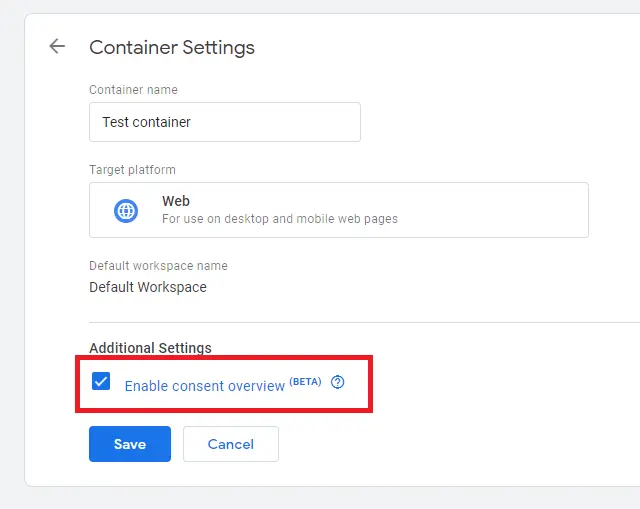
This allows you to configure consent checks at the tag level.
Step 3: Configure Default Consent State
In GTM:
- Create a new tag
- Select “Consent Initialization – All Pages” trigger
- Add custom HTML:
<script>
gtag('consent', 'default', {
   ad_storage: 'denied',
   analytics_storage: 'denied',
   ad_user_data: 'denied',
   ad_personalization: 'denied'
});
</script>
This ensures no data is transmitted before consent.
Step 4: Update Consent Based on User Choice
When user accepts consent:
gtag('consent', 'update', {
   ad_storage: 'granted',
   analytics_storage: 'granted',
   ad_user_data: 'granted',
   ad_personalization: 'granted'
});
Your CMP should handle this automatically.
Step 5: Configure Tag-Level Consent Checks
Inside GTM:
Open each Google Ads / GA4 tag
Go to “Consent Settings”
Require appropriate consent types
Example:
GA4 → requires analytics_storage
Google Ads → requires ad_storage and ad_user_data
Step 6: Test in Preview Mode
- Click Preview in GTM
- Visit site
- Decline consent
- Confirm tags do NOT fire
- Accept consent
- Confirm tags fire
(See instructions on how to test in Preview Mode)
Step 7: Validate in Google Tag Assistant
Use Tag Assistant to confirm:
Consent parameters transmitted
No data leakage before consent
Proper signal updates
Advanced: Consent Mode GTM Implementation for SPA / React
If using:
React
Next.js
Single Page Applications
Ensure:
Consent update events fire dynamically
Page view tracking respects consent state
Example event listener:
window.addEventListener('consentGranted', function() {
   gtag('consent', 'update', {
      analytics_storage: 'granted'
   });
});
This prevents tracking errors in dynamic routing environments.
Common Errors in Google Consent Mode V2 Setup
1. No Default Denied State
Without default denial, tags may fire prematurely.
2. Missing ad_user_data Signal
Required for Google Ads remarketing.
3. Not Using Google-Certified CMP
Modelling may not activate.
4. Incorrect Trigger Order
Consent Initialization must fire before other tags.
Consent Mode v2 vs Basic Cookie Blocking
Feature | Basic Blocking | Consent Mode v2 |
Prevents cookies | ||
Sends consent signals | ||
Enables modelling | ||
Required for EEA Ads |
Consent Mode v2 preserves partial measurement via modelling even when consent is denied.
Enforcement & Risk Context
Google enforces Consent Mode requirements for EEA advertisers. GDPR enforcement remains active, with fines up to €20 million or 4% of global turnover.
Regulators also scrutinise improper consent banners (CNIL enforcement actions).
Implementing Consent Mode correctly protects both compliance posture and ad performance.
Troubleshooting Guide
Ads not tracking conversions?
Check ad_user_data parameter
Confirm CMP integration
Validate tag firing sequence
Analytics data missing?
Confirm analytics_storage granted
Verify GA4 configuration tag
Modelling not active?
Confirm Google-certified CMP status
Ensure signals sent before tags fire
How CookieHub Helps
CookieHub is a Google-certified CMP designed specifically to simplify google consent mode v2 setup.
As a certified provider, it supports:
Proper Consent Mode v2 modelling
Automatic signal transmission
Script blocking prior to consent
Unlike generic banner tools, CookieHub ensures:
ad_storage
analytics_storage
ad_user_data
ad_personalization
are transmitted correctly.
It also supports:
GDPR
CCPA
US state privacy laws
within a unified consent engine.
For developers, CookieHub offers:
JavaScript API
React and Next.js compatibility
Multi-domain management
For marketing teams, it protects ad performance while maintaining compliance.
If you want a smooth, certified consent mode GTM implementation, CookieHub eliminates guesswork.
Frequently Asked Questions
For advertisers serving ads in the EEA, yes. Google requires it for modelling and compliance.
ad_storage controls cookie storage; ad_user_data controls transmission of user-level advertising data.
Technically yes, but modelling support requires a Google-certified CMP.
No. It complements GDPR requirements but does not replace legal obligations.
Use GTM preview mode and Google Tag Assistant to confirm signal transmission.
Conclusion
A proper Google Consent Mode V2 setup is essential for any business running Google Ads in the EEA.
By following this step-by-step GTM guide, you can:
Configure default denied states
Update consent dynamically
Send required signals
Validate implementation
Preserve advertising modelling
Compliance and performance do not have to conflict.
Use a Google-certified CMP like CookieHub to simplify implementation and ensure modelling support.
Share this post
Start your free trial of CookieHub
Complete your Consent Mode v2 setup with confidence!
14 day free trial
No credit card required